Release Notes
Product Name: TeamTexter® 3.0 Web Application
Release Number: v3.0 SP17
Date of Release: January 3, 2026
1. New Feature: API Integration for Message Extraction
- Issue Summary: Clients needed a simple way to download message data for reporting, auditing, and external analysis without relying on manual exports.
- Resolution: A new authenticated API endpoint is now available that allows clients to download all message logs in a single file. Customers can use any standard API calling tool to make a request to the endpoint, passing their account credentials (company code, email, password) in the request body. Once authenticated, the API returns a secure download link for the message log file, which can then be saved and used for reporting or analysis outside the platform.
API Endpoint:
https://app.teamtexter.io/v3/api/auth/download-message-logs
Method:
POST
Request Login Credentials:
- company_code
- password
Response:
Download link
- Impacts: There is no impact on existing messaging or platform functionality. This feature is additive and optional, designed for customers who require direct access to message data.
2. New Feature: Opt-In Message Customization
- Issue Summary: Companies could not change the default opt-in message in the system.
- Resolution: Users can now customize the opt-in message based on company requirements. When enabled, TeamTexter will send the customized opt-in message instead of the default one. To use this feature, navigate to Administration > Account > SMS/MMS Configuration.
- Impacts: More flexibility and improved brand consistency. No changes to opt-in logic or compliance behavior.
3. Bug: Opt-In Handling for Sequences
- Issue Summary: When a sequence was started for a contact who had not yet opted in, the opt-in and sequence message flow could behave inconsistently.
- Resolution: The system now correctly sends the opt-in message first. Once the user opts in, the sequence of messages is automatically resumed as expected.
- Impacts: No impact on existing opted-in users.
4. Enhancement: Start Sequence from New Conversation Screen
- Issue Summary: Users had to start a conversation and a sequence as separate actions, increasing setup time.
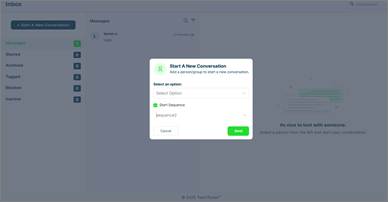
- Resolution: An optional dropdown has been added to the “Start New Conversation” screen, allowing users to start a sequence simultaneously.
- Impacts: Existing conversation flows remain unchanged.
5. New Feature: Save Sequences as Drafts
- Issue Summary: Users were unable to save partially completed sequences without activating them.
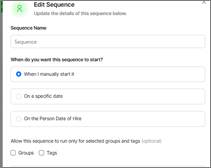
- Resolution: Sequences can now be saved as Draft or set to Active, giving users more control during creation and editing.
- Impacts: Improved sequence management and reduced risk of accidental activation.